
THE MACBOOK BUYING GUIDE2026 EDITION
MacBook Air vs MacBook Pro (2026): Which Should You Buy?
A bigger everyday workspace or a smaller machine with more pro features? Here’s how the 15-inch M5 Air and 14-inch M6 Pro actually fit your life.
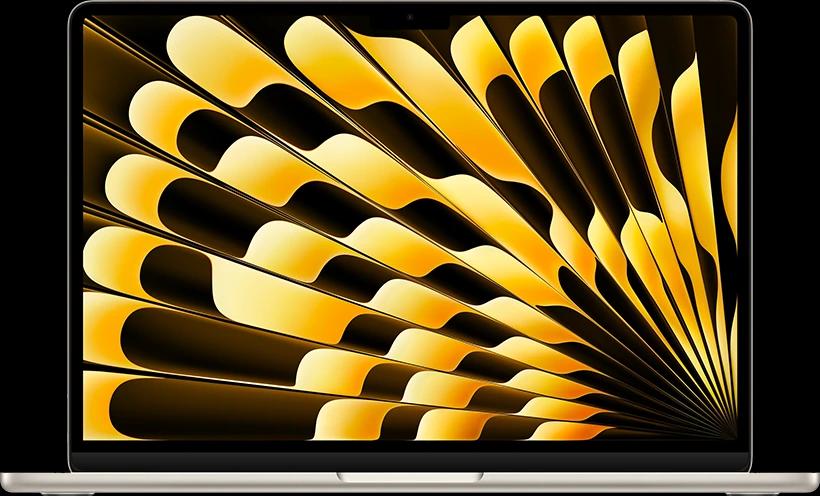
MacBook Air M5
15.3-inch · 16GB · 512GB
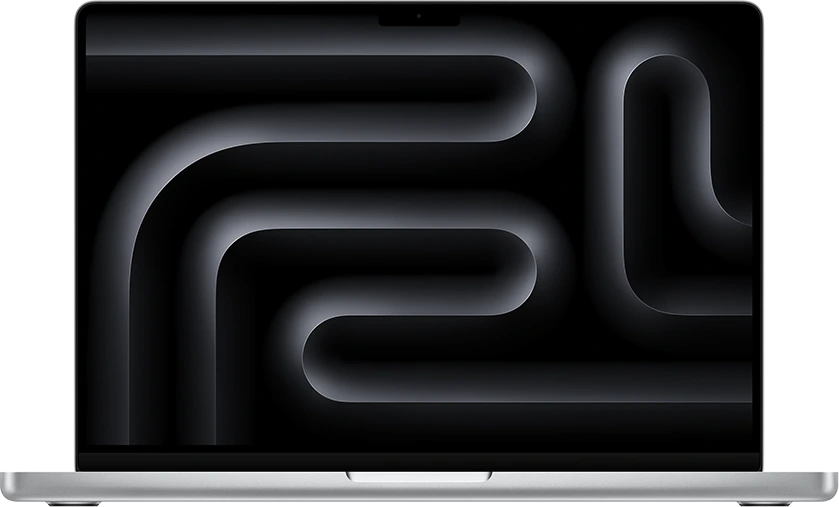
MacBook Pro M6
14.2-inch · 16GB · 1TB
THE QUICK VERDICT
Buy for your work.
Keep the rest.
If you’re choosing a MacBook Air or MacBook Pro for ordinary daily use, we’d start with the Air. Pay extra for the Pro when its screen, connections, or sustained performance solve a recurring problem.
A bigger canvas.
A smaller bill.
For students, home users, and office workers who want room for two windows, silent operation, and capable everyday performance.
A better screen.
More headroom.
For regular video exports, long builds, HDR work, and anyone who frequently plugs in SD cards or HDMI displays.
MacBook Air vs Pro: the exact specs
This is the base M6 chip in the 14-inch Pro, compared with the 15-inch M5 Air. Both have 16GB of memory; the Pro doubles storage. Other configurations can change the buying decision.
| What matters | MacBook Air M5 / 15-INCH | MacBook Pro M6 / 14-INCH |
|---|---|---|
| Exact model / finish | MDVH4LL/A · Midnight | MHWT4LL/A · Space Black |
| Processor / graphics | M5 · 10-core CPU / 10-core GPU | Base M6 · 12-core CPU / 12-core GPU |
| Memory / bandwidth | 16GB unified · 153GB/s | 16GB unified · 153GB/s |
| SSD storage | 512GB | 1TB |
| Display | 15.3-inch IPS LCD · 2880 × 1864 | 14.2-inch mini-LED LCD · 3024 × 1964 |
| Refresh rate | 60Hz | ProMotion · adaptive up to 120Hz |
| Brightness | 500 nits | SDR up to 1000 nits outdoors; HDR 1000 sustained / 1600 peak |
| Apple battery estimates | Up to 18h streaming / 15h web | Up to 24h streaming / 16h web |
| Cooling | Fanless | Active cooling with fans |
| Ports | 2 × Thunderbolt 4, MagSafe 3, headphones | 3 × Thunderbolt 4, HDMI, SDXC, MagSafe 3, headphones |
| External displays | Up to 2, plus built-in display | Up to 2, plus built-in display |
| Wireless | Wi-Fi 7 · Bluetooth 6 | Wi-Fi 7 · Bluetooth 6 |
| Width × depth × height | 13.40 × 9.35 × 0.45 inches | 12.31 × 8.71 × 0.61 inches |
| Weight | 3.3 lb / 1.51 kg | 3.4 lb / 1.55 kg |
| Apple U.S. price, Nov. 17, 2026 | $1,499 · 16GB / 512GB | $1,999 · 16GB / 1TB |
- Exact model / finish
- MacBook Air M5MDVH4LL/A · Midnight
- MacBook Pro M6MHWT4LL/A · Space Black
- Processor / graphics
- MacBook Air M5M5 · 10-core CPU / 10-core GPU
- MacBook Pro M6Base M6 · 12-core CPU / 12-core GPU
- Memory / bandwidth
- MacBook Air M516GB unified · 153GB/s
- MacBook Pro M616GB unified · 153GB/s
- SSD storage
- MacBook Air M5512GB
- MacBook Pro M61TB
- Display
- MacBook Air M515.3-inch IPS LCD · 2880 × 1864
- MacBook Pro M614.2-inch mini-LED LCD · 3024 × 1964
- Refresh rate
- MacBook Air M560Hz
- MacBook Pro M6ProMotion · adaptive up to 120Hz
- Brightness
- MacBook Air M5500 nits
- MacBook Pro M6SDR up to 1000 nits outdoors; HDR 1000 sustained / 1600 peak
- Apple battery estimates
- MacBook Air M5Up to 18h streaming / 15h web
- MacBook Pro M6Up to 24h streaming / 16h web
- Cooling
- MacBook Air M5Fanless
- MacBook Pro M6Active cooling with fans
- Ports
- MacBook Air M52 × Thunderbolt 4, MagSafe 3, headphones
- MacBook Pro M63 × Thunderbolt 4, HDMI, SDXC, MagSafe 3, headphones
- External displays
- MacBook Air M5Up to 2, plus built-in display
- MacBook Pro M6Up to 2, plus built-in display
- Wireless
- MacBook Air M5Wi-Fi 7 · Bluetooth 6
- MacBook Pro M6Wi-Fi 7 · Bluetooth 6
- Width × depth × height
- MacBook Air M513.40 × 9.35 × 0.45 inches
- MacBook Pro M612.31 × 8.71 × 0.61 inches
- Weight
- MacBook Air M53.3 lb / 1.51 kg
- MacBook Pro M63.4 lb / 1.55 kg
- Apple U.S. price, Nov. 17, 2026
- MacBook Air M5$1,499 · 16GB / 512GB
- MacBook Pro M6$1,999 · 16GB / 1TB
More screen, or a better screen?
The Air’s 15.3-inch display is appealing if you work without an external monitor. A document beside a browser, a spreadsheet, or a video timeline gets more physical room than on the 14.2-inch Pro. The Pro has more pixels, but that does not make its panel physically larger.
For display quality, the Pro earns its premium. Its mini-LED backlight can brighten highlights while keeping dark areas darker, which helps HDR video look more lifelike. ProMotion refreshes at up to 120Hz, so scrolling and motion can look smoother than on the Air’s 60Hz panel. Both support the P3 color gamut and True Tone; neither standard configuration is a touchscreen.
Brightness needs context: Apple’s 1600-nit Pro figure is a peak for HDR content. Its SDR specification reaches up to 1000 nits outdoors, while the Air is rated at 500 nits. Those figures do not mean every white webpage is always three times brighter on the Pro. For ordinary indoor writing, the Air’s screen is a sensible fit. For HDR work and bright environments, the Pro has the stronger specification.
MacBook Air M5
More physical workspace
Liquid Retina · IPS LCD
- Refresh rate
- 60Hz
- Brightness
- 500 nits
More room for a document beside your browser.
MacBook Pro M6
More advanced display
Liquid Retina XDR · mini-LED
- Refresh rate
- Up to 120Hz ProMotion
- Brightness
- HDR: 1000 nits sustained / 1600 peak
Smoother motion and more capable HDR viewing.
The portability result is surprisingly close. Apple lists the Air at 3.3 pounds and the Pro at 3.4. The Air is noticeably thinner, but its larger width and depth take more space in a bag or on a cramped tray table. Choose the Pro for a smaller footprint; choose the Air for a thin, larger workspace. “Air” does not mean a dramatic weight saving here.
Do you actually need the M6?
For browsers, office apps, coursework, and video calls, the M5 Air is our default recommendation. Paying more for a newer processor is hard to justify if your main bottleneck is an internet connection, a crowded screen, or getting your work organized.
The M6 here has a 12-core CPU and 12-core GPU, versus the Air’s 10 of each. Core counts alone do not predict a particular app’s speed. Cooling also matters: a brief photo edit lets a chip work in bursts, while repeated exports or builds keep it busy long enough to heat up.
MATCH THE MACHINE TO YOUR WORK
Which MacBook fits your day?
Start with the work you repeat, then check its memory needs.
- Web, office & video calls
- Air recommended
More than enough for ordinary daily work. Both have Center Stage cameras; Pro adds HDMI for presentations.
- College coursework
- Air recommended
Room for notes and research. Check that your department’s required software runs on macOS and Apple silicon.
- Programming
- Depends
Air for web projects; Pro for frequent long builds. Heavy containers and simulators may need more than 16GB.
- Photo editing
- Depends
Air for occasional edits; Pro for SD imports, XDR viewing, and repeated batch exports.
- Regular video editing
- Pro recommended
Cooling, XDR, and a 1TB SSD suit frequent exports. Short, occasional projects can still fit the Air.
- Music production
- Depends
Air avoids fan noise near a microphone; Pro suits demanding sessions. Large sample libraries may need more memory.
- Sustained demanding work
- Pro recommended
A better fit for repeated builds and exports. Check project memory needs before choosing either 16GB model.
What independent testing actually tells us
Notebookcheck’s 15-inch M5 Air review used 32GB of memory and a 2TB SSD, rather than our 16GB/512GB model. It found strong short-term performance and reduced CPU power under longer workloads. That supports the cooling trade-off; it does not establish an exact performance score for our cheaper configuration.
Tom’s Hardware tested a base M6 Pro with 16GB and 1TB, matching the main configuration here. Its 4K-to-1080p Handbrake conversion took 2 minutes 50 seconds, versus 3 minutes 31 seconds for its earlier M5 Pro laptop. That comparison demonstrates a gain in that test, but it is not a timed race against this M5 Air. We have not tested either laptop ourselves.
Match the machine to the workload
Programming: the Air suits web development and many student projects. The Pro is more compelling if large compiles are a daily wait. Check your IDE, virtual machines, containers, and simulators together: both exact models have 16GB shared between apps and graphics, so neither removes a memory bottleneck.
Photo and video editing: occasional photo work and short videos can fit the Air well. Both chips accelerate H.264, HEVC, and ProRes media. Frequent exports, effects-heavy timelines, and HDR monitoring make a stronger case for the Pro’s cooling and display. Its SD reader and 1TB SSD also make a camera workflow less awkward.
Music and creative production: the Air has no fan noise to enter a microphone. The Pro is a better starting point for sustained processing, but large sample libraries, many plug-ins, 3D work, or local AI models may need more memory than either configuration. Check the software and project requirements before treating “Pro” as a guarantee.
Fewer adapters. Fewer small frustrations.
An HDMI cable for a meeting. A camera’s SD card. An SSD and a monitor at the same time. These are the moments when the Pro’s connections earn their keep.
MacBook Air
THE ESSENTIALS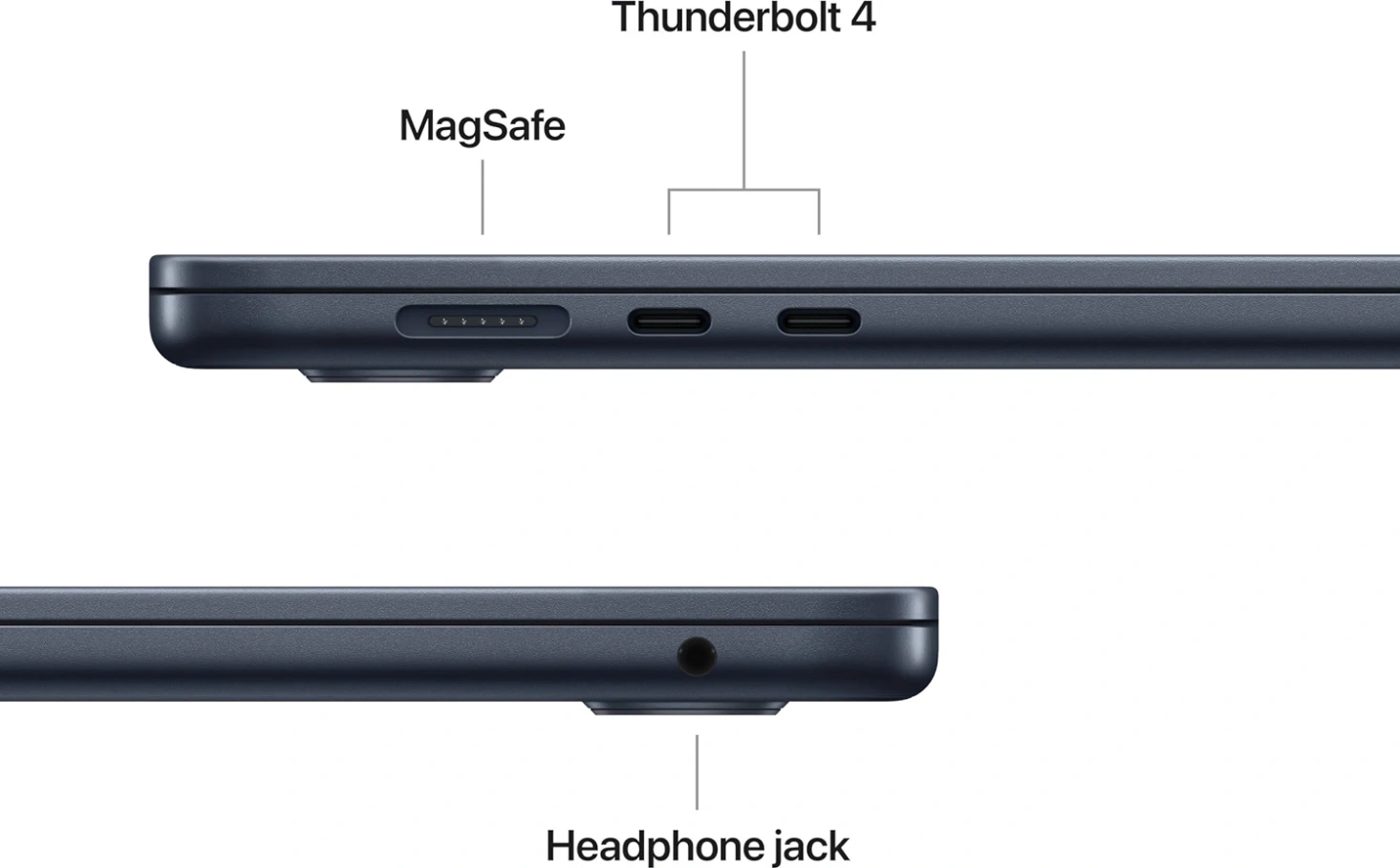
MacBook Pro
MORE BUILT IN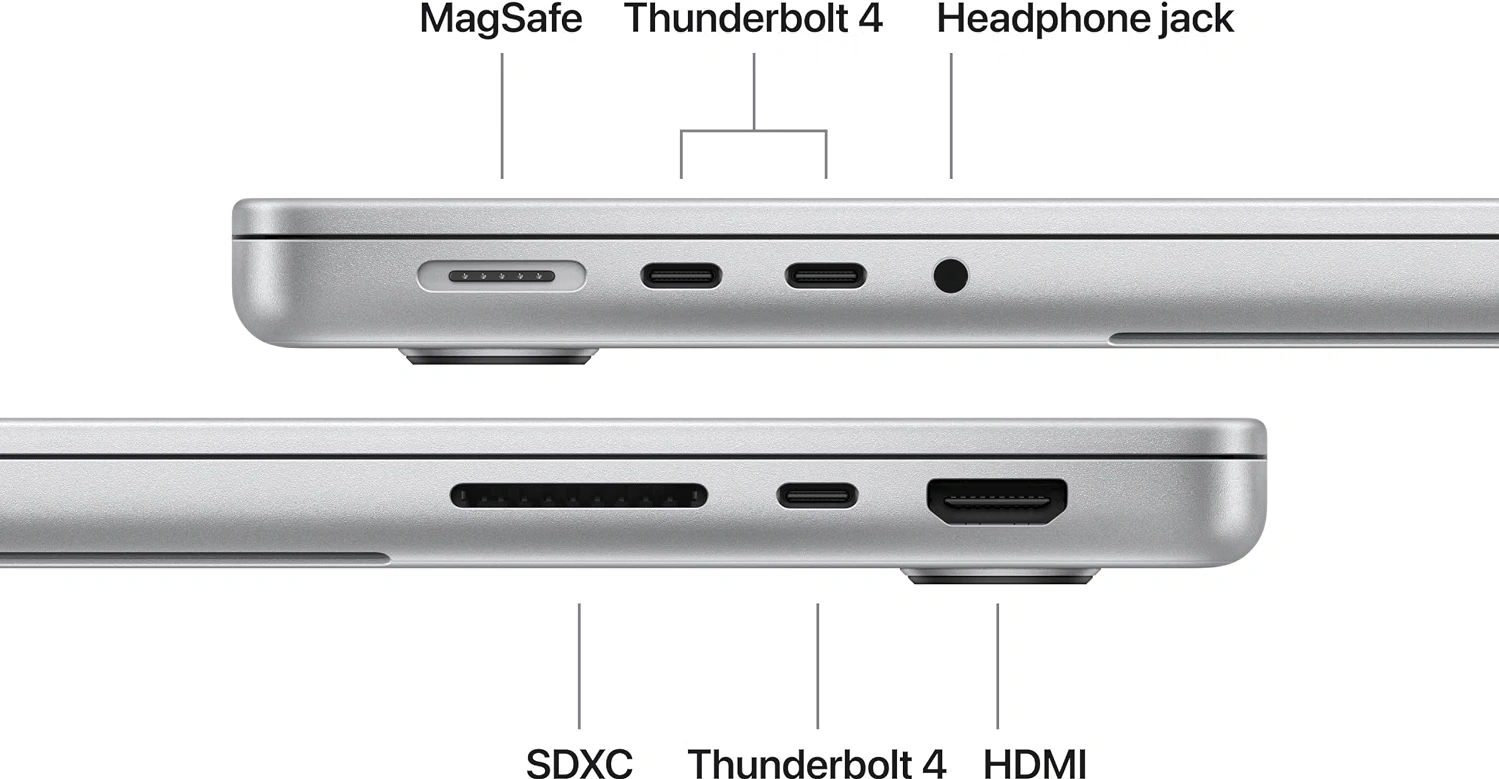
Both use Thunderbolt 4 at up to 40Gb/s. This base M6 Pro does not inherit Thunderbolt 5 from higher-tier models. Neither includes USB-A or Ethernet; older accessories and wired networking can still need an adapter.
Both support up to two external displays while keeping the laptop screen active. The Pro’s HDMI makes common monitor connections simpler, but it does not add a third external display. Resolution, refresh rate, cables, and dock compatibility still matter; consult Apple’s display-support limits before buying a dock. Wi-Fi 7 and Bluetooth 6 are shared features.
Battery, heat, and the sound of silence
Apple estimates up to 18 hours of streaming and 15 hours of wireless web for the Air, versus 24 and 16 for the M6 Pro. Notice how much smaller the gap is for browsing. A streaming headline is not a promise for a day of video calls, editing, or compiling.
Independent results add context: Notebookcheck’s upgraded Air lasted 17 hours 12 minutes in its Wi-Fi test at 150 nits, and 6 hours 44 minutes at maximum brightness. Tom’s Hardware’s 16GB/1TB M6 Pro ran for 19 hours 5 minutes in a different 150-nit test mixing browsing, streaming, and OpenGL work. These are different methods and configurations, so they should not be read as a direct battery-life margin.
The Air’s fanless cooling means no fan noise, even in a quiet library. The Pro uses fans to move heat out during demanding work; they can become audible. Either machine can warm up under load. We have no matched noise or temperature measurements for these exact two SKUs, so we would not promise a particular sound level or cooler lap.
Camera, sound, and everyday controls
Both have a 12MP Center Stage camera with Desk View, Touch ID, a backlit Magic Keyboard, and a Force Touch trackpad. Both also have six-speaker systems with force-cancelling woofers; the 15-inch Air is not the four-speaker 13-inch model. Apple describes the Pro’s microphones as studio-quality, but most callers should decide based on the bigger display and port differences.
What does the extra money buy?
APPLE U.S. CONFIGURATION PRICES
+$500
Pro premium over this Air
Checked November 17, 2026 · before tax
What you gain
- 1TB SSD instead of 512GB
- XDR display and up to 120Hz ProMotion
- M6 processor and active cooling
- HDMI, SDXC, and an extra Thunderbolt port
What stays the same: 16GB memory.
Apple’s current U.S. store prices are $1,499 for the Air and $1,999 for the Pro. These are manufacturer prices for the compared configurations, not Amazon prices or a claim about today’s best deal. The $500 gap also includes a storage upgrade, so it is not a pure processor premium.
If you will use the Pro’s advantages every week, the extra cost can be reasonable. If you mainly write, browse, and meet online, the Air leaves money for a backup drive, monitor, or other needs. Compare final checkout totals and the memory you actually need. A discounted Pro does not automatically become the better fit, and a lower-priced Air with too little memory is not a saving.
Keep a large photo library or several video projects locally? The Pro’s 1TB SSD gives you more room before you need an external drive. If your documents live in the cloud and your files fit comfortably in 512GB, that extra capacity may offer little practical benefit.
For longevity, buy around the workload you expect to grow into. Memory and internal SSDs are not practical user upgrades on these machines. External storage can expand file capacity, but it cannot add unified memory. Neither chip generation guarantees a particular number of future macOS updates.
A few good questions
Is the MacBook Pro worth the extra money?
Yes, if you regularly use its brighter, smoother XDR display, HDMI and SDXC ports, or sustained processing power. For writing, browsing, and video calls, the Air usually makes better use of your budget.
Is the MacBook Air powerful enough for programming?
For web development, coursework, and many small app projects, yes. Check the memory needs of your IDE, simulators, and containers. These two configurations both have 16GB; the Pro name does not solve a memory shortage.
Which MacBook is better for college?
The 15-inch Air is our default choice here for its larger workspace and lower Apple price. Confirm that your department’s software runs on Apple silicon and macOS before choosing either MacBook.
What is the biggest difference between the MacBook Air and Pro?
Here, it is the overall package: the Air has a larger 15.3-inch screen and fanless cooling; the Pro adds a smaller but more capable XDR screen, fans for sustained work, more ports, and a 1TB SSD.
Is the MacBook Air good enough for video editing?
Yes for occasional projects, especially with supported H.264, HEVC, or ProRes media. Frequent exports, complex effects, and large timelines favor the Pro, but demanding projects may require more memory than either exact 16GB configuration offers.
Choose the features you’ll use.
Our pick for most everyday buyers is the 15-inch M5 Air. Choose the M6 Pro when the display, longer heavy workloads, and built-in connections are worth the premium to you.
Amazon affiliate links · Research & disclosures
The everyday pick
15-inch MacBook Air M5
16GB memory · 512GB SSD · Midnight
Model MDVH4LL/A
For study, office work, and occasional creative projects with room for two windows.
- Larger 15.3-inch workspace
- Silent, fanless cooling
- Lower manufacturer price
Keep in mind: 60Hz screen; no HDMI or SD slot; less storage than this Pro.
The demanding-work pick
14-inch MacBook Pro M6
16GB memory · 1TB SSD · Space Black
Model MHWT4LL/A
For regular exports, long builds, HDR work, and connecting cameras or HDMI displays.
- XDR display with ProMotion
- Active cooling for sustained work
- 1TB SSD, HDMI, and SDXC
Keep in mind: Smaller screen, higher price, and the same 16GB of memory.